
AI Cost Calculator in Excel to Compare AI Solutions
Download “The Real Cost of Enterprise AI” and its editable Excel calculator. This practical FinOps for AI kit brings implementation, technology, human review and support costs into one comparison, providing a shared basis for decisions across business, technology and finance.
PDF guide · Editable Excel calculator · Decision summary worksheet included in the guide
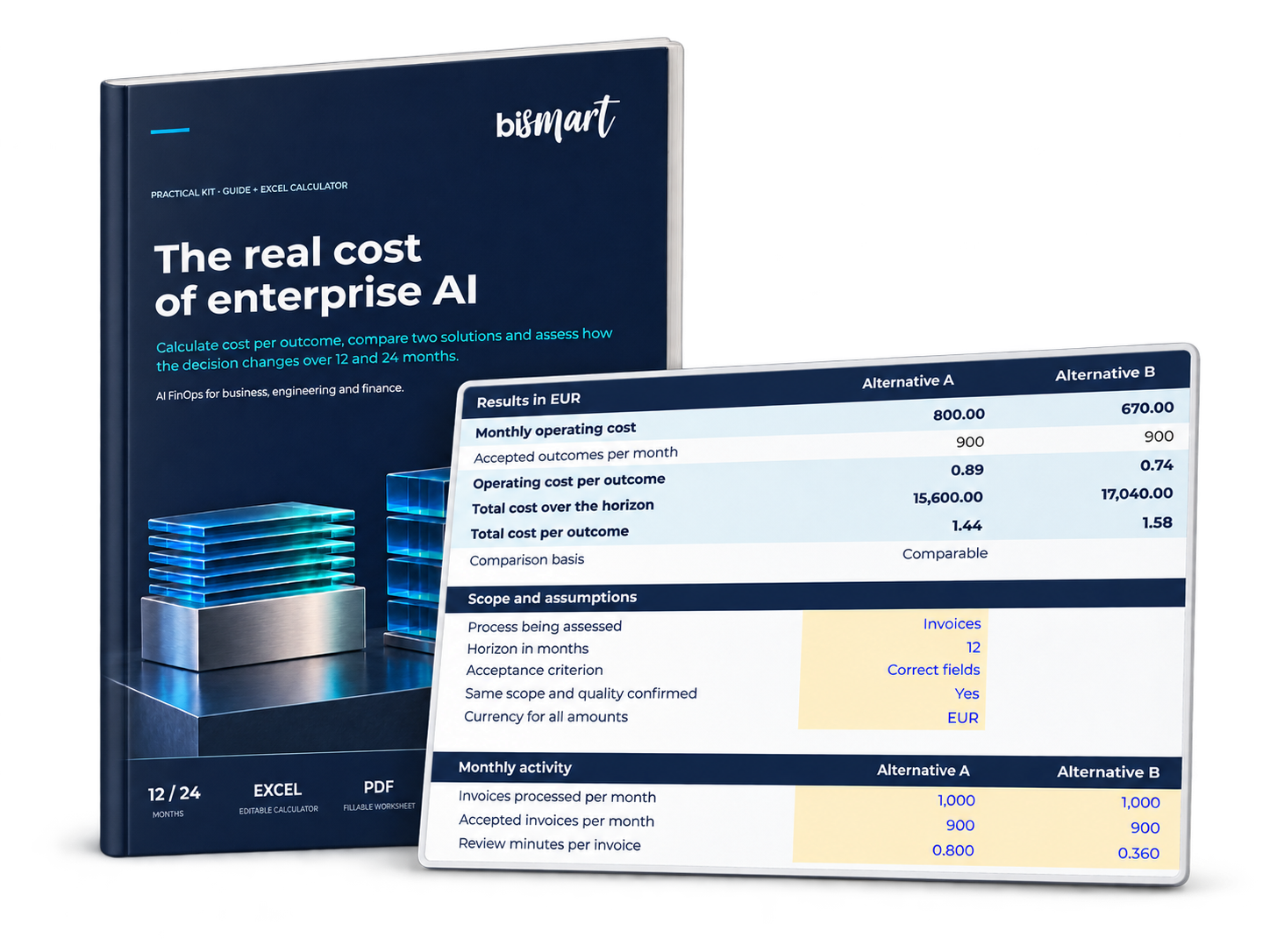
Everything you need to start comparing two AI options and prepare a proposal that includes costs, assumptions, and next steps.
Lower Monthly Costs Can Still Mean a Higher First-Year Cost
One AI solution may require a larger initial investment while reducing ongoing operating costs. Another may be cheaper to launch but need more human review for every task.
The comparison depends on workload, quality requirements and how long the solution will be used.
The guide and calculator help organize these variables and estimate the cost per accepted outcome: a completed deliverable that meets the requirements defined for the process.
What Decisions Can This Kit Support?
- Compare two AI alternatives on the same basis. Include implementation, operating costs and human review within a consistent scope.
- Calculate cost per accepted outcome. Connect spending with deliverables that meet the agreed business requirements.
- Evaluate total costs over 12 and 24 months. Understand how the initial investment affects the comparison.
- Test the assumptions behind the estimate. Review how workload, costs and review effort influence the results.
- Prepare a proposal for discussion. Document the proposed decision, figures awaiting validation, ownership and review date.
What Is Included in the AI FinOps Kit?
| Recurso | Copy |
|---|---|
|
The Real Cost of Enterprise AI — Practical Guide |
Explains the cost components, walks through a worked comparison and clarifies how to interpret the results from a business perspective. |
|
AI Cost Calculator in Excel |
Compares two alternatives using monthly costs, implementation costs, cost per accepted outcome and total costs over 12 and 24 months. |
|
Decision Summary Worksheet |
Included in the guide, this worksheet captures the process, acceptance criteria, costs, assumptions requiring validation, proposed decision and review responsibilities. |
The Monthly Difference Does Not Tell the Whole Story
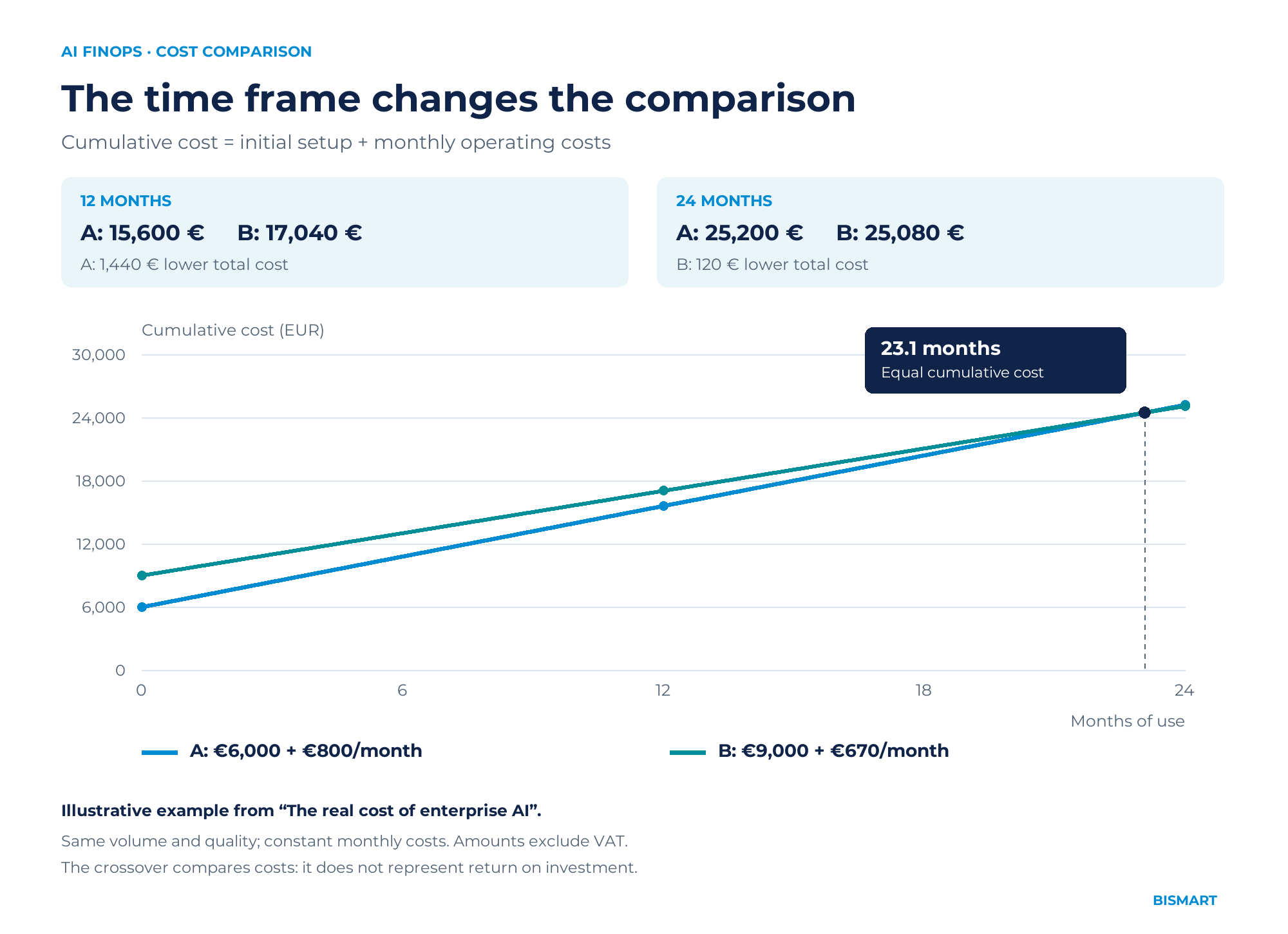
In the guide’s illustrative example, Alternative A costs €800 per month to operate, while Alternative B costs €670.
However, B requires a larger initial investment: €9,000, compared with €6,000 for A.
At 12 months, A has the lower total cost. At 24 months, B becomes the lower-cost alternative.
The Excel calculator applies the same comparison to the costs and assumptions of another use case.
A Shared Starting Point for Business, Technology and Finance
Designed for teams evaluating an AI initiative, comparing proposals or reviewing the cost of a process before expanding its use.
The guide explains the concepts in business language. The comparison can begin with aggregated costs, without breaking down every model call, and identify which figures still need measurement or validation.
Start with a use case from your company
Download the guide and see if you can answer these three questions:
- Who has the authority to approve or halt the system?
- What data and actions are permitted?
- What evidence demonstrates that their controls are working?
Prepare for your next AI decision with a cost comparison
Compile the initial investment, operating costs, and expected results into a single analysis. Download the guide and calculator to start documenting the use case.
Download Guide + Calculator
Frequently Asked Questions
What's included in the download?
A practical guide in PDF format, an editable Excel spreadsheet, and a fillable worksheet within the guide to document the decision.
Is technical knowledge of AI or FinOps required?
The guide is intended for users in business, technology, and finance. It explains the concepts needed to interpret the comparison and allows you to start with aggregated costs.
What costs can the calculator compare?
The comparison takes into account the implementation and recurring costs of the model, the tools, the licenses, human review, and the support allocated to the process.
Can solutions from different vendors be compared?
Yes. It is necessary to define the same scope, workload, and quality standards for the comparison to be useful.
Does the calculator measure return on investment?
It calculates costs and allows you to compare alternatives. To estimate the return, you also need data on the profits earned and a baseline for the current process. The guide explains this difference.