
In today’s data-driven world, the organizations that thrive are those capable of turning information into actionable insight. The ability to manage large volumes of data, analyze them in real time, and extract business value has become a decisive competitive advantage. In this context, Databricks stands out as one of the most powerful and complete platforms in the modern analytics ecosystem.
Databricks unifies Big Data, artificial intelligence, and machine learning in a single cloud environment, breaking down data silos and fostering collaboration between technical and business teams. Its lakehouse architecture allows companies to centralize data from multiple sources, process it at scale, and turn it into information ready for analysis or predictive modeling.
If you want to dive deeper into how Databricks powers advanced analytics in Azure, we recommend reading:
With Bismart, a reference partner in advanced analytics and data-driven solutions, your company can implement Databricks with a clear, secure and value-oriented strategy.
What is Databricks?
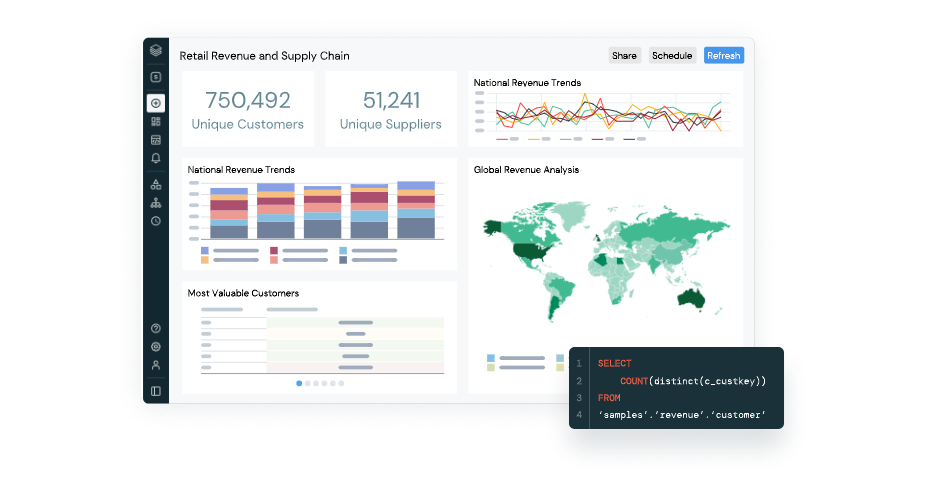
Databricks is a cloud-based platform designed to accelerate the lifecycle of data and artificial intelligence. It was created to unify data engineering, data science, business analytics, and machine learning within a single collaborative environment, enabling smooth interaction between all data teams.
Its foundation lies in the Lakehouse concept — a hybrid architecture that combines the best of data lakes and data warehouses. Through Delta Lake, Databricks ensures ACID transactions, version control, centralized governance, and optimized storage for both structured and unstructured workloads.
Key components include:
- Managed Apache Spark™: A distributed processing engine that handles massive datasets with speed and flexibility.
- Delta Lake: An open format that provides reliability, scalability, and performance for big data environments.
- MLflow: A native MLOps framework for managing experiments, models, and machine learning deployments in a standardized way.
- Unity Catalog: An integrated data governance solution with traceability, auditing, and fine-grained access control.
- Databricks SQL and Collaborative Notebooks: Unified workspaces for data analysis and visualization that integrate seamlessly with Power BI, Tableau, and other BI tools.
Together, these components enable organizations to bridge the gap between data and innovation, ensuring a continuous flow from ingestion to advanced analytics and applied AI.
Azure Databricks: Databricks within Azure
When Databricks operates on Microsoft’s cloud, it becomes Azure Databricks — a managed service that combines Databricks’ power with Azure’s native security, scalability, and integration.
Azure Databricks provides a unified experience: users can spin up optimized clusters in seconds, take advantage of auto-scaling, and access Azure-native analytics, storage, and security services. It enables collaborative notebooks, batch and streaming data pipelines, and machine learning model deployment within a single platform.
This managed version also offers deep integration with services such as Azure Data Lake Storage, Azure Synapse, Azure Data Factory, and Power BI, without relying on external connectors. Thanks to this native synergy, data movement across the Azure ecosystem becomes seamless and efficient.
Architecture of Azure Databricks and Integration with the Azure Ecosystem
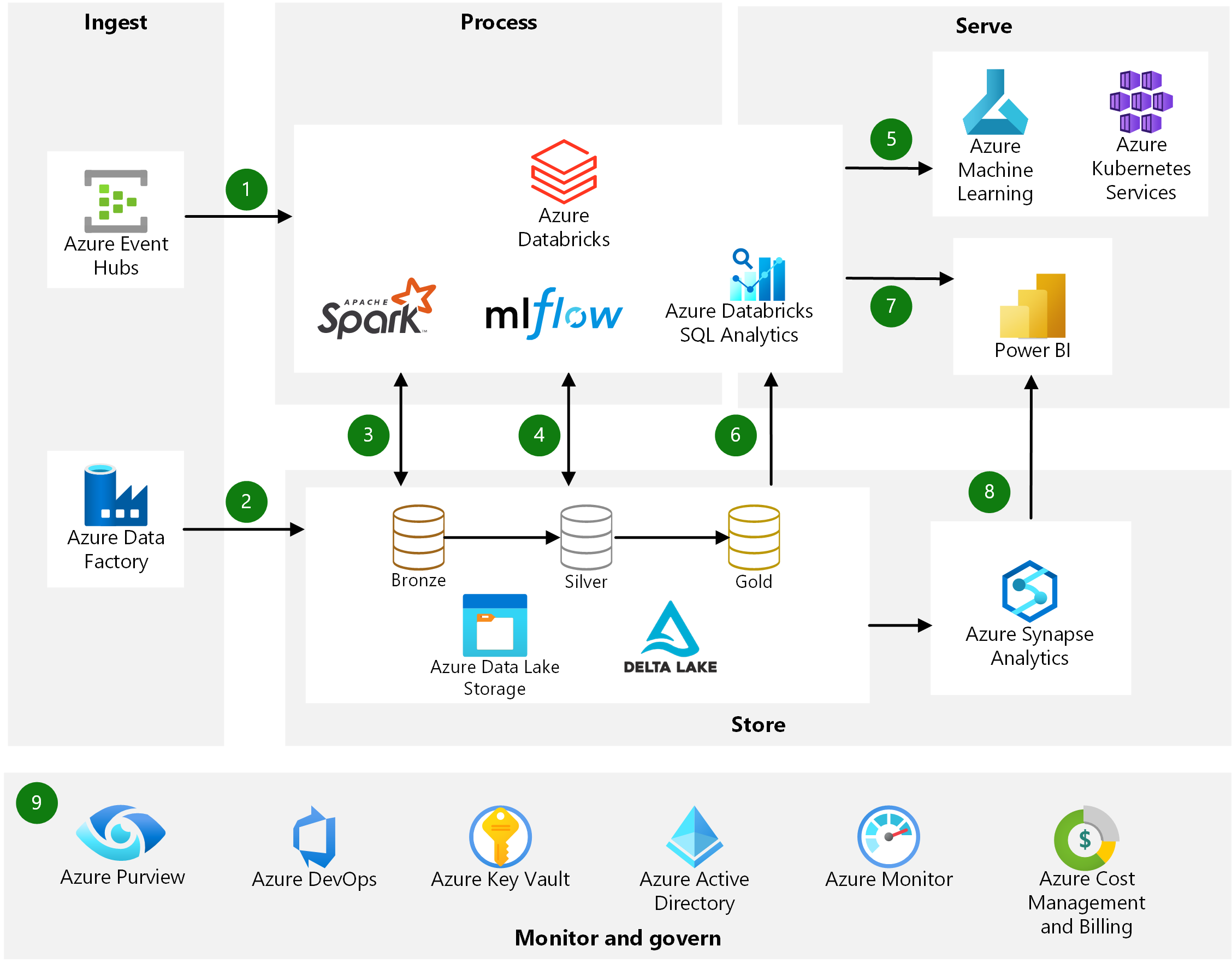
Azure Databricks inherits Azure’s built-in governance, access control, and identity management via Azure Active Directory, simplifying permission administration in enterprise environments. Its scalability, optimized performance, and tight integration with Azure’s stack make it a natural choice for organizations already operating in that ecosystem.
If you’d like to explore how it works and review real-world scenarios, check out our article What is Azure Databricks and What Is It Used For?
Azure Synapse or Azure Databricks?
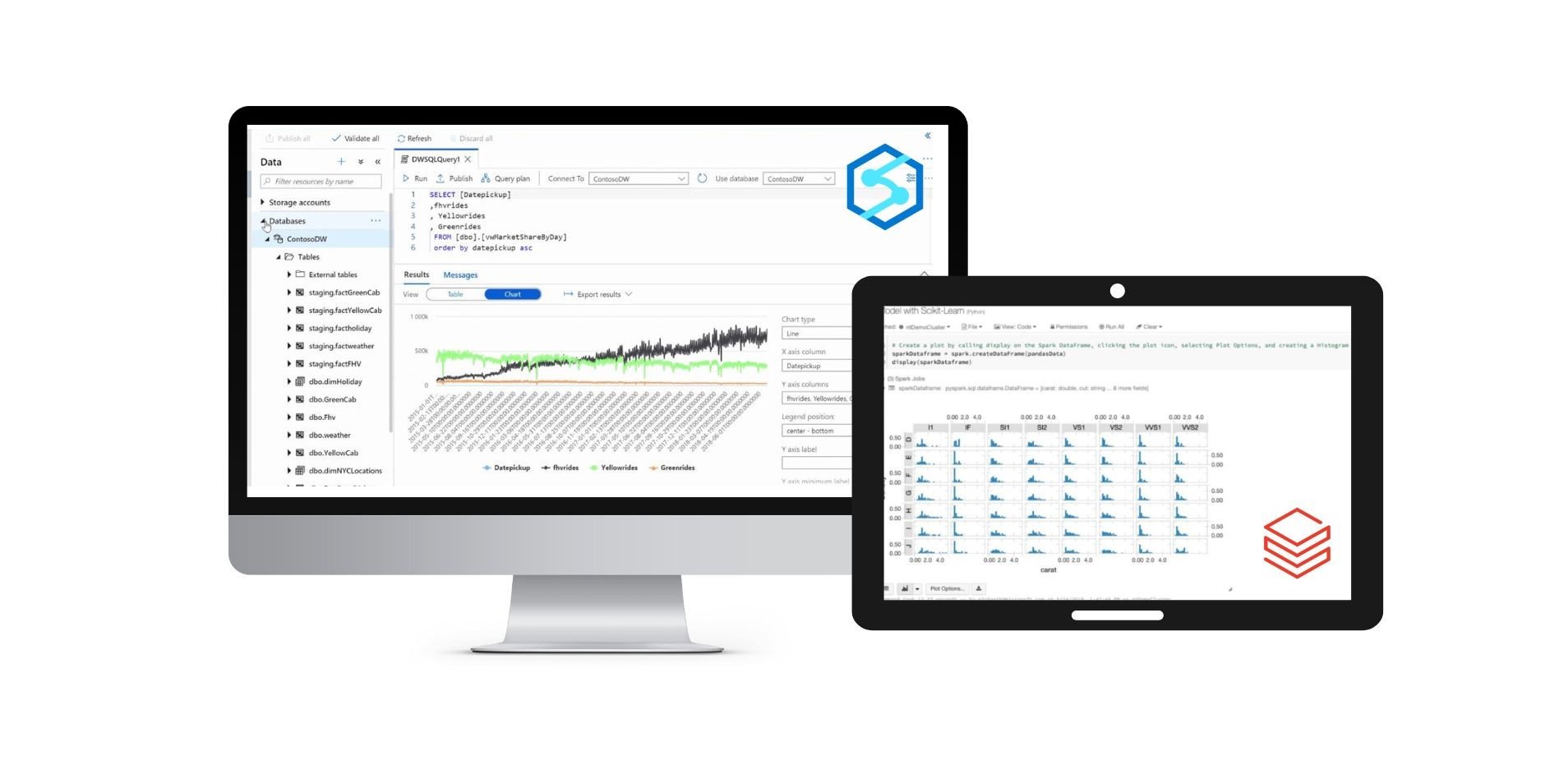
If you want to understand how Databricks fits into the broader Azure ecosystem and how it differs from other data services, we recommend our article Azure Synapse vs. Azure Databricks vs. SQL: Key Differences, which compares features, use cases, and performance.
Benefits of Working with Databricks
1. Unified Data Integration
One of the great strengths of Databricks is its unified approach. Instead of working with multiple tools for ingest, transformation and analysis, teams can do it all in a single environment. This reduces operational costs, simplifies architecture and speeds access to knowledge.
Native integration with cloud services - such as Azure Data Lake, Synapse, Power BI or AWS S3 - makes it easy to connect heterogeneous sources, automate ETL/ELT processes and ensure data consistency at every stage of the pipeline. The result is a single, reliable view of the data, accessible to the entire organization.
2. Cloud Scalability and Performance
Databricks leverages the elasticity of the cloud to deliver optimal performance for any workload. It can scale horizontally or vertically depending on demand, processing terabytes of data in minutes without compromising efficiency or stability.
Its cluster-based architecture minimizes technical complexity — businesses only pay for the resources they actually use. This translates to cost optimization, agility, and frictionless growth as the business scales.
3. Machine Learning and AI Without Barriers
Databricks removes traditional barriers to machine learning by offering a collaborative, governed, and automated environment. With MLflow, data scientists can log experiments, compare models, track results, and deploy them to production with full transparency.
Support for frameworks such as TensorFlow, PyTorch, and scikit-learn, along with compatibility with Python, R, and SQL notebooks, makes Databricks a flexible ecosystem that accelerates the creation of predictive and AI-powered solutions.
4. Greater Decision-Making Efficiency
With Databricks SQL, analysts can explore and query data directly without depending on engineering teams. Queries run directly on the Lakehouse, reducing latency and eliminating unnecessary intermediate steps.
Paired with visualization tools like Power BI or Tableau, this results in faster reports, real-time analytics, and data-driven decision-making — empowering the organization with agility and trust.
Databricks use cases
Databricks is versatile and adaptable across industries and business domains. Its power and flexibility make it an ideal platform for advanced analytics, applied AI, and data governance.
1. Real-Time Advanced Analytics
Databricks enables real-time data processing from sensors, IoT devices, logs, or transactional systems. Businesses can detect anomalies, monitor operations, and anticipate issues with up-to-date insights.
In retail, for example, Databricks helps analyze customer behavior in real time to personalize offers or manage dynamic inventories.
2. Business Process Optimization
Databricks helps automate processes and identify inefficiencies. In manufacturing, it can predict equipment failures or detect bottlenecks before they impact operations.
The combination of advanced analytics and predictive modeling improves productivity, reduces costs, and enhances operational sustainability.
3. Demand Forecasting and Consumer Behavior
Its integrated machine learning engine allows teams to build forecasting models based on historical data, market trends, and external variables to predict demand.
Companies in retail, tourism, or energy use Databricks to adjust supply, optimize planning, and make strategic decisions based on future scenarios.
4. Data Governance and Security
With Unity Catalog, Databricks ensures centralized data governance, permission management, classification, and auditing.
This is essential for compliance with regulations such as GDPR or ISO 27001 and maintaining full data lineage. The result is trust, compliance, and total security throughout the data lifecycle.
Why Choose Bismart as Your Databricks Partner?
Implementing Databricks requires technical expertise, strategic vision, and business insight. Bismart is an official Databricks partner with a solid track record in business intelligence, advanced analytics, and artificial intelligence projects.
Our mission is to turn technology into measurable business outcomes, guiding organizations through every stage of their data maturity journey.
In addition to being an official partner, Bismart applies Databricks in real-world projects in data engineering, analytics, and AI automation. You can learn more in our article What We Do with Azure Databricks where we explain how we use this technology to help organizations modernize their data architecture, optimize processes, and create business value.
Why Bismart is the ideal partner for your Databricks project:
- Proven experience in Azure Databricks: We design Lakehouse architectures that integrate Data Factory, Synapse, and Power BI under a unified framework.
- Agile, business-first methodology: We prioritize use cases with the highest ROI and visibility, delivering measurable results from the first iteration.
- Proprietary accelerators: Pre-built orchestration frameworks, data quality templates, and governance models ready for deployment.
- Governance and security by design: We implement Unity Catalog, domain-based access control, and full data lineage.
- Training and adoption: We empower technical and business teams to make the most of the platform, ensuring sustainable adoption.
- Continuous support and improvement: Post-implementation assistance to scale and maintain long-term performance.
With Bismart, Databricks becomes more than a tool — it becomes a strategic driver for innovation, efficiency, and competitive advantage.
Request a Databricks Demo with Bismart
Data is your organization’s most valuable asset. Databricks lets you harness it with unprecedented speed, precision, and scalability.
Discover how to transform your data strategy with Bismart and Databricks
Request a personalized, no-obligation demo and take the first step toward a smarter and more efficient data model.